.png)

The Tilkee’s public endpoints are powered by the same underlying technology that powers the core Tilkee application. Tilkee engineering team closely monitors usage of the public APIs to ensure a quality experience for users of the Tilkee’s platform.
The API is organized around the following objects, you may use in any integration.
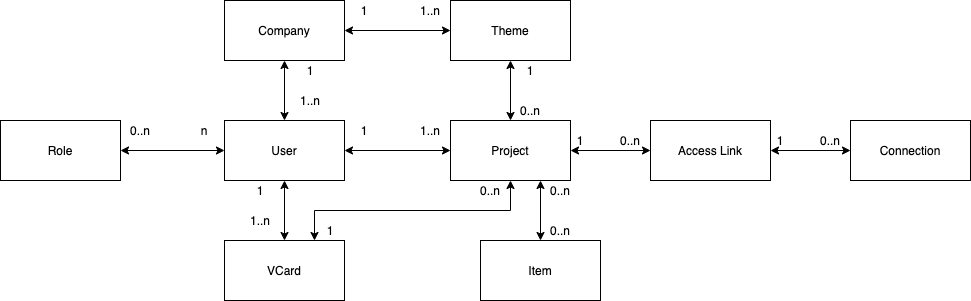
Tilkee runs on 2 APIs
Currently, Tilkee has 2 APIs : V2 and V3.
V2 is the historical API of Tilkee, it has all the features that you may find on the Tilkee Application. It's complete but sometimes too much and it can get complicated to integrate.
V3 is the new API of Tilkee, it only has the core features of Tilkee and has been think for the developers following the REST standard.
The following API references are the V3 references.
In order to access to the API V2 references, click here.
Which API should you use?
With the time, we will add more features to the V3 and make the V2 deprecated, so if you start your project now, you should definitively use the V3.
Then, if some features are missing from the API V3, you can check the V2 in order to do implement them.
Good to know : Access tokens compatibility
Both APIs have their own OAuth process, but you have to know that you can call the API V2 endpoints using an access token granted by the API V3.
However, the opposite is not true, you can not use a V2 token to call the V3 endpoints.
V3 OpenAPI description
If needed, you can get OpenAPI description of our V3 API here.
Available environments
In order to get started, the first thing you have to do is to create an account on Pre-production environment : https://app-staging.tilkee.com/. Then you will be able to use these credentials to authenticate yourself on both APIs.
Then you can call our APIs using the following endpoints :
- API V3 : https://endpoints-staging.tilkee.com/v3
- API V2 : https://api-staging.tilkee.com/v2
Then, when you are ready to go live, you can switch to the production environment : create your first account on https://app.tilkee.com.
And switch your API calls to :
- API V3 : https://endpoints.tilkee.com/v3
- API V2 : https://api.tilkee.com/v2
API Response format
All responses from the API are formatted as JSON with a HTTP Status code.
Objects body contain an id that can be used to find more information about this object or find its related.
HTTP Status code
| 200 | Success. |
| 401 | Unauthorized. User's token is not valid anymore, you should refresh it and try again. |
| 403 | Forbidden. User's roles does not allow you to execute this operation. |
| 404 | Not Found. Resource not found. |
| 422 | Bad Request. Wrong input in parameters |
| 500 | Internal Server Error. Something wrong happened on our side. Do not hesitate to reach us if you face this issue. |
| 503 | Service Unavailable. |
Authorized file format
We currently support files these file types: doc, docx, ods, odt, pps, ppsx, ppt, pptx, xls, xlsm, xlsx, mp4, png, jpeg.
But, for many reason, it's preferable to use .pdf files when it's possible.